Assistant Kernel 2.0.0 update
After the first version of Assistant Kernel, I took a break and went to work on other projects. During that time, Moonshot released Kimi K3 which is a direct competitor to Fable 5 from Anthropic and GPT 5.6 Sol from OpenAI.
Although generation costs a lot with this model, it wasn’t as much as the other two. This meant that I could give it a try without ruining myself. I could have subscribed to Moonshot services directly, but I decided to avoid vendor lock-in and to instead open an OpenRouter account. This service allows me to put credits in one account and use their API as a gateway to any AI model from any lab at the lowest provided price.
The benchmark I used for Kimi K3 was to build a frontend for Assistant Kernel and it did it extremely well! It was something I tried with Qwen3.6:27B locally, but it failed to even do something that works. K3 just asked me what I wanted and did it right away. We’ll come back to this later, but this made me realize that, sometimes, you need a bit more “bang” when using an AI and OpenRouter was the perfect service to integrate into Assistant Kernel for that specific moment. This became the content of version 2.0.0.
In this post, we’ll see the process of adding a new provider to Assistant Kernel. I also added web browsing to it so I’ll talk about it in the end.
Models abstraction
Adding a new provider by just putting it in and making it show all the available models can work, Open WebUI does it, but it isn’t what Assistant Kernel was supposed to be. The philosophy is to hide as much of the actual AI management from the interface as possible by providing a simple API to it.
To arrive at this simple user experience while having multiple providers with a lot of models, I decided to abstract the models themselves from the interface. This meant only showing a small subset chosen by the user.
Configuration File
This is where a configuration file is the best solution. The software should give the freedom to the user to use the models they want and providing a way to configure this is the best way to achieve that.
The path follows the XDG Base Directory Specification from Freedesktop.org. That specification sets a standard to which file goes where in
a system of the UNIX family. By looking at it, we can see that our configuration folder (and so file) will reside in $XDG_CONFIG_HOME which is usually ~/.config.
That file should contain all the user specific configurations of AKernel. This includes which models the user wants to see and use. It will also includes some API keys.
I chose TOML since I didn’t want to overcomplicated this configuration. It looks like this :
models = [
    {
        name = "ara",
        id = "qwen3.6:35b",
        description = "Great for sciences, programming and mathematics",
        provider = "ollama"
    },
    {
        name = "eule",
        id = "gemma4:26b-a4b-it-qat",
        description = "Great for creative writing",
        provider = "ollama"
    },
    {
        name = "kolibri",
        id = "gpt-oss:20b",
        description = "Quick chat",
        provider = "ollama"
    }
]
As we can see, the id is the actual identifier for the inference provider. We also specify that provider so we can add a new one later without changing the configuration. There’s also a
name if you would like to show a different name from the model id since they can be really long. The last thing is description just so you can write a little something for yourself next
to their names.
Adding a new provider: OpenRouter
Now that we added a configuration file that allows us to specify a provider, we should add a new one that isn’t Ollama. I picked OpenRouter since it is probably the best service of its kind. Allowing any model you want through the same API is hard to beat.
Before looking at that, I’d like to talk about what I meant with wanting more “bang” out of AI. We’ll talk about that and then about the actual implementation of adding a new provider.
Local vs cloud AI
Local models are amazing. It is quite the achievement that todays models are as good or better than older frontier models at a ridiculously small fraction of the weights. It is always important to have some true frontier models, but I believe that local ones should be able to serve the vast majority of user requests while being more private and environmentally friendly since you aren’t sending your requests to a random data center. If a new AI labs truly want to support the average end user and the economy as a whole, it would be ridiculous to put reasonably sized open weights models off the table.
That being said, the current memory shortage for consumers leaves us with not as much memory as we’d need for even 100B-200B MoE models. Personally, I’m running models around the 30B mark and I have to say that they’re great every day, but can lack for more specialized tasks or maybe you just want more “intelligence” from them at a certain point.
This is where cloud models come in. Unless you own a ridiculous amount of compute, you aren’t running 1T+ parameter models locally and those are where the “bang” comes from for those specific situations. While not being able to run them, we can easily pay data center companies or frontier labs to run the inference for us. As long as that “bang” is in the cloud, we need AI cloud providers.
Requests routing
For Assistant Kernel, the logic for adding a new provider is simple. We simply add a new provider in the configuration and modify the code to run and make those provider specific requests for us. This sounded fine until I realized that the AKernel code was tightly coupled to the Ollama API since I built it specifically against it.
We need to understand that most AI providers follow the standard set by the OpenAI API. The idea was to make it trivial for programs to switch off OpenAI without having to plan an enormous migration. Just change the base URL and everything should work out of the box. The elephant in the room is that this “standard” is somewhat opinionated. This meant that, if you wanted to provide a “better” API, it is also going to be opinionated in its own way which is what the Ollama API is. They’re mostly similar, but with a few subtle differences.
To counter the problem of having two distinct APIs that don’t expose the same endpoints, I decided to build an abstraction layer between the services and the inference providers. I called that layer the inference layer.
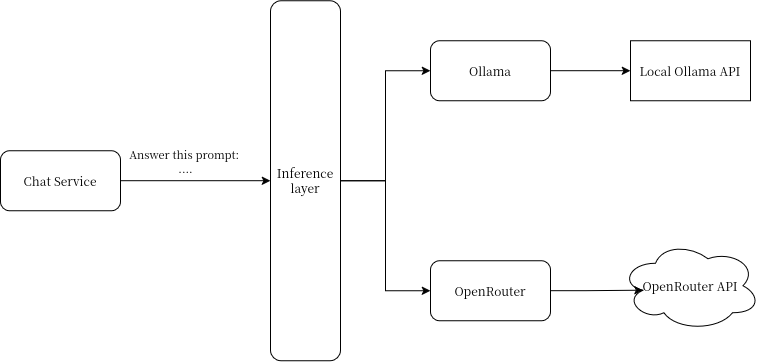
See full picture by clicking here ↗
The point of it is to receive a request, check the given model and check who provides it in the configuration. This gives us which inference provider we have to send a requests to. It has standard types that are used by services and it has a few helper methods to convert from one type to another.
Building this meant decoupling all the code from Ollama which was a big task, but also made the whole business logic independent from any provider. We could add a new provider or completely remake the whole packages behind that inference layer and the services would not care at all as long as those types don’t change.
AI web browsing
The last thing added to the new version is web browsing. It isn’t a big addition code-wise, but it is in usability. Letting a model be able to search the web and see web pages itself has become part of how we use AI. It also makes for an interesting problem to solve while implementing it.
The subtle need for it
It is weird that a model might need to browse the web since they’re marketed as those big black boxes of pure knowledge. The need for web browsing comes from how they’re made.
AI models are trained on training data that was scraped from the internet. You could train one model on a continuous flow of new information, but it is easier to just mark a line where scrapping stops and the training starts. The time between that cutoff, the release of the model and when you’re using it becomes increasingly longer over time. This isn’t a problem for general knowledge that doesn’t change, like the color of the sky, but it is one for newer knowledge. By itself, the model can’t know what happened after its training data cutoff.
Even if the data that was trained into its weights isn’t up to date, the model is just as good as it was when it released. This means we can simply give it a way to browse the web and it will somewhat solve the data cutoff problem. By using its ability to reason, it can see that its data isn’t up-to-date and search for newer data.
The added bonus is that it solves the issue of smaller models that tend to “forget” or not know more precise things. This is just a by-product of them being made to be small. The fact they can still reason through things means we can externalized that knowledge and let them query for it instead of knowing it. That externalized data bank is the internet. An example of this is that I could ask a smaller model “Who is the engineer girl in Stellar Blade?” or “Who represents Finland in Girls und Panzer?” It probably doesn’t know such precise things, but it isn’t important if it can query the web for the answer.
A two tool system
Tools are a way to let models call for specific functions or programs to run and get an answer from it. It doesn’t know the time, but it could call a tool to get the current time. For web browsing, we need two.
When we browse the web, we interact with two specific pieces of software. The first one is the search engine which allows us to search for web pages related to a query we made. The second one is the web page itself that we’re opening to see the content.
We can summarize this in an example of searching for pancake ingredients. I could open DuckDuckGo (a search engine) and make a query like “pancake ingredients”. With the results it gives me, I might click on a link to open a website (a web page) that gives me:
- 1 egg
- 1 cup of milk or water
- 1 cup of flour
- Nutella
- Bananas
- Smetana (what?).
To allow a model to interact with those two pieces of software, we need tools. More precisely, one tool that allows it to query a search engine and receive the results and one tool to be able to fetch web pages and see what they contain.
Web searching
The search engines we use are graphical and would be an enormous pain to use programmatically. Fortunately, some companies offer APIs for this which makes our job a lot easier. Brave is one of those and we can sign up for their search engine API with 5$ of free requests every month so why not use it.
What the tool does is simple. It receives a search query from the model and sends it to Brave. When it receives the answer, we could send it directly to the model and it would work. It would be able to understand it. One thing is that a huge part of that requests is either useless in our use case or is JSON semantics. Those two things can take way more tokens than they need to and inflate the context for no reasons.
To solve this problem, we simply trim the JSON and list the results in Markdown. That Markdown will be sent to the model. The reason for Markdown is that it has a clear and minimal syntax that models are used to work with. So sending a result in that format is just a net gain while not being expensive to compute.
Fetching web pages
Fetching web pages follows the same pattern as web searches, but simpler. It is easy to forget that the web pages we see are composed of HTML which is just text. This lets a web browser show a page the way it was intended to be shown and has a side effect of being easily fetchable by us.
We expose a tool to the model that allows it to fetch a given URL. When it does, we just do an HTTP GET request at that URL just like a web browser does. The only problem is the same thing we had with searching, but even worse. We receive HTML and whatever is included in that
request. HTML is far more verbose than JSON and, if given to a model, will take a ridiculous amount of tokens compared to the information it brings.
We have to solve this the same way which is parsing the content of that page and converting it from HTML to Markdown. This is a bit of a daunting task so I was glad when I found the Go package html-to-markdown which does it for us. This tool became trivial since it was just fetching a web page and feeding the result into that package. The resulting Markdown is returned to the model with the same benefits that we had with searching.
What’s next?
Along with bug fixes, this is the complete update of the version 2.0.0 of Assistant Kernel. For some time, I’m probably going to put it down to work on other things and explore projects I had in mind for a long time.
If I come back to this later, there’s one small change I would like to make that came to me after finishing this update. I realized that the fact OpenRouter is an OpenAI compatible API means I could probably make AKernel requests from any provider that isn’t OpenRouter or Ollama since all of the code is already in place. It would be a trivial change.
Also, I would probably work on an interface for it in a separate code base. It was nice seeing Kimi K3 making one, but I realized that I’m doing those projects for the love of the game so full on vibe coding without ever opening an editor felt empty and it felt like I didn’t earn that interface.