Modern operating systems
We might not realize it, but operating systems are all around us since computers are all around us. Today’s operating systems ecosystem isn’t as big as it was in the 60’s and 70’s where every computer had its own OS made from scratch out of necessity, but we can clearly see that computers we use every day, like our phone or laptop, run an operating system. That OS is a huge part of how we use and perceive them.
We might conclude that each of them have one written completely from scratch for the specific purpose they serve. It makes sense to see it that way, but as we’ll see in this article, modern operating systems are more similar than they might let on at first glance.
We’ll start by seeing the difficulty of writing a modern kernel and then we’ll look at what modern operating systems actually are and finish with a few examples of this in action.
Difficulty of writing a modern kernel
As stated in my previous article on operating systems, writing a kernel is a daunting task. It is an enormous piece of software that interacts closely with the hardware. When every computer had a custom kernel written for it, they were complicated, but simple enough to justify writing one. It was also a necessity for various reasons like non-standardized CPU architectures and hardware.
At the core of it, today’s kernel developers somewhat have, in retrospect, a “simpler” job since CPU architectures got standardized and the craft of building a kernel is known and documented even if it isn’t at the same level as web development. This means we should have continued to see a huge ecosystem of kernels over time, but we saw the opposite. There are two reasons for it.
The first is that the product moved up in the abstraction chain. Simply delivering a working computer isn’t the product anymore. Let’s take a phone as an example. Android or iOS are extremely important to it, but to the user, the features such as the camera software, the app store or the ability to make calls are more what they perceive as the product. This means that all the engineering juice of companies will go towards that and not building a brand new kernel for your new phone.
The second reason is the hardware complexity going way up since the 60’s and 70’s. This isn’t bad, but it means that the kernel has to have drivers that will probably be, also, extremely complex. A good example of this are graphics cards. If I built a new kernel today and wanted AMD GPUs to work on it, I would need a driver. I got about three ways to get it. I could:
- Ask AMD if they could spend the manpower to write a driver for my kernel
- Reverse engineer some or every Radeon graphic cards and write it myself
- Port the 5.9 million lines of code of the open source Linux kernel driver.
You can see how all of these options aren’t really viable. AMD doesn’t care about my kernel and reverse engineering or porting the entire Linux kernel driver is an enormous project that would require a dedicated full time team of engineers.
Those reasons brought the centralization of operating systems. The ever increasing complexity of writing a new kernel meant that companies and hobbyists started to reuse the same kernel they already had or some off-the-shelf ones. I don’t need to beg a hardware company or go on an ambitious project to have drivers at the cost of working with a kernel that was made with thousands of different configurations for thousands of computers.
By seeing how we reuse kernels, it is reasonable to assume that all operating systems are just copies of each other. This is where the distinction between user space and kernel space comes.
What is user space
As we established in the previous article, the kernel needs full control over the computer to accomplish its job. It can achieve that in kernel space and it is, as the name implies, the only program running in this execution mode alongside some privileged code such as drivers.
User space is the contained execution mode for every other software running on the computer. This is broad and we might think that this software is just user programs like a word processor or a web browser, but this is partly right. The kernel exposes its system calls to user programs, but those are extremely primitive. Sure they’re used by the user programs, but the user isn’t going to log in and create files using them directly.
This is how an OS finds itself having to make user space programs instead of just a kernel. The kernel exposes some primitives and doesn’t really care what is happening in user space. The whole experience of an operating system is made by special user space programs that sit between the user and the system calls.
Learning this is learning that an operating system is a term not for a single software, but for a complete software platform distributed together and the kernel is only one piece of it that the user never interacts with directly. This means we can reuse it without the user realizing that it is something they already used before because the user space of the OS is completely different.
By seeing operating systems this way, we can understand why, technically, the top 500 super computers and a cheap Android phone are both based on the Linux kernel, but we say those computers have different OS. The user space part of those are completely different.
Customizing the user space
Now that we know that an operating system is a package of programs and almost all of them reside in user space, we can make the assumption that modifying those modifies how we use and perceive the OS. This is right! We’ll go over some important user space programs that, when changed, changes the OS.
Initialization system
Like we said earlier, the kernel doesn’t really know what is happening in user space, but it launches a designated first user-space process, often called the init system or process ID 1. After booting, the kernel will launch it so it is the first process created hence process ID 1.
The init system has the role of managing background services and launching what needs to be launched at start time like a login manager so the user can use the computer. The other important role it has is basically preparing some of the user space. At boot time, the kernel did almost nothing and it falls on the init system to initialize things that need to be initialized, mount drives that need to be mounted and making sure everything is ok.
While the computer is running, the init system continues coordinating background services, clean up processes that were orphaned or that are done running etc. It does this until the system is put to sleep, shut down or rebooted since this also falls on the init system to do.
You can see how changing this software doesn’t change how you use the computer directly, but impacts a lot of background work that makes sure everything is running fine. Many Linux distributions use systemd, while Android has its own init. Both of those have different priorities that shape indirectly the user experience.
Window manager
A window manager or compositor (we won’t touch on those here) is the software that manages how your windows are displaying on your screen. This doesn’t sound impressive on the surface, but it is basically defining half the user experience of an OS out of the box. A few paradigms came out of this space and you’ll see how impactful it can be.
- Floating window managers are what a lot of people are used on a computer. They allow windows to float and stack around the screen. This is what Windows uses for example.
- Tiling window managers have a smaller user base, but a dedicated following. It makes the windows tile on the screen like kitchen tiles. No windows stack on top of each other.
- Single-application window managers are what we see on single purpose devices that have a single GUI the user has access to. Things like fancy thermostats with a screen have this.
The window manager and compositor space is really active so this list isn’t exhaustive, but it should give you an idea of the most common approaches.
Supporting programs
I’m cutting this short since we could go on about this for a long time, but I think this is the right way to call those. Supporting programs are every piece of the operating system the user touches or sees while using it.
As we said, the kernel exposes some primitives and we need a program for almost every basic functionality you want your OS to have. For logging in, we have login managers. For managing files, we have file explorers. For settings, there are settings software. We can go on and on with this. They’re all important and, without them, the operating system would probably miss features or feel incomplete.
Think of everything you consider part of the OS on your computer, phone etc and you can probably fit almost all of those into this category. Even wallpapers have their own software to be set up and shown.
Desktop environments
Now that we have all the user space pieces of the operating system, minus the init system, we can assemble them together to get what we call the desktop environment. This is where what we said earlier comes true. You can have the same kernel and the same underlying operating system, but changing the desktop environments completely changes the user experience and the feel of it.
Here a few examples of how we can change the user experience from one desktop environments to the other. Remember that all of those are from operating systems based on the Linux kernel.

See original picture by clicking here ↗

See original picture by clicking here ↗

See original picture by clicking here ↗

See original picture by clicking here ↗
Modern examples
Now that we have everything needed to see how modern operating systems are made, I’d like to go through a couple of real operating systems that do exactly this. This section is going to be small, but it is intended to show that what we use every day is made using the same principle we discussed earlier: user space modifications on an existing kernel.
Windows NT and Windows XP to 11
For a while, Microsoft was supporting two versions of Windows based on different kernels. There were the DOS-based versions that consumers used and a Windows NT based one. With Windows XP, they completely threw out DOS and chose to maintain only NT which Windows is still based on today.
Of course, NT got updated and had some major changes over the years. If it didn’t, it would be unusable today or we wouldn’t have improvements in performance or battery life, but as new versions of Windows came out, most of the changes the user sees and interacts with are user space changes that affected directly the user experience of the OS.
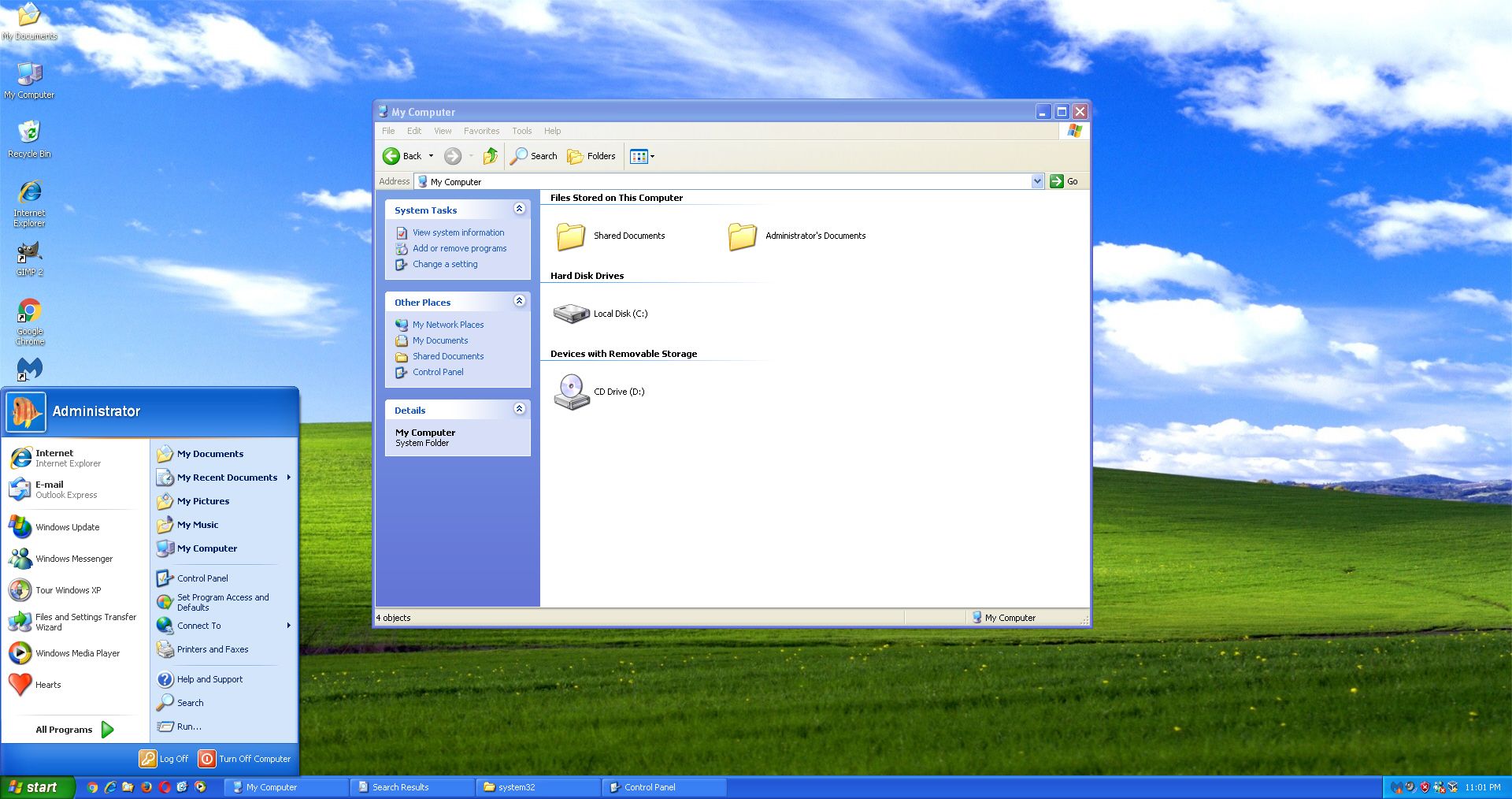
See full picture by clicking here ↗
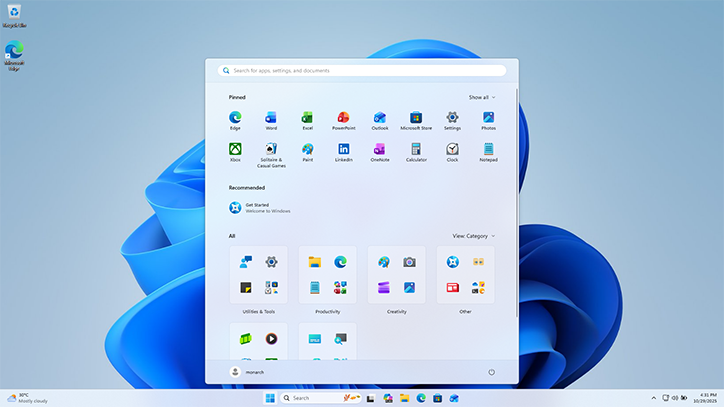
See full picture by clicking here ↗
Of course, there were many Windows versions between the two and this is glossing over some major redesigns, like the Windows 8 Metro UI, but we can’t deny that user experience changed with every Windows version even if lightly.
FreeBSD and PlayStation 3 to 5
FreeBSD is a less known operating system among users. It is somewhat special since, unlike Linux, it ships with a kernel and its user space programs. The fact it is open source makes it a prime candidate to serve as the base of a new OS.
This is what PlayStation did with the PlayStation 3, 4 and 5. We don’t know the complete extent of it, but we know that the PlayStation 3 GameOS is based on FreeBSD and NetBSD while the PlayStation 4 Orbis OS is based on FreeBSD. The PS5 appears to be continuing with Orbis OS, but it hasn’t been confirmed. Those examples show that it is possible to take some parts of a desktop-focused OS like FreeBSD and completely transform the user experience into a couch gaming console OS.
Here are some examples of the PlayStation GameOS and Orbis OS:

See original picture by clicking here ↗

See original picture by clicking here ↗
Linux and its distributions
The last and probably the most famous example of this is the Linux kernel. It being “just” an open source kernel with support from a lot of hardware companies places it easily as the top choice for new operating systems.
It became the dominant kernel for any operating systems and it got fitted on almost every type of computer imaginable. TYou can see this by looking at an Android phone, a Debian desktop and a random smart sensor: they’re using the same kernel while also providing vastly different user experiences.
It isn’t the only choice, but Linux is commonly used as the kernel for new products across a wide spectrum of computer types. This made it develop an enormous ecosystem of distributions based on one another.
Conclusion
To conclude all of this, we saw how difficult it was to create a new modern kernel and how the effort was probably not worth it for a vast majority of the use cases. We also saw how this led to many operating systems using the same kernels and differentiating themselves primarily through user space rather than through new kernels.
This is, in a lot of cases, how new operating systems are made today. It makes sense and it works, but is it really that good? This way of doing things essentially reduced kernel development to a few big projects and, outside of hobby projects and research, reduced the evolution that would come from creating entirely new kernels.