October installer
Github repository: october-installer
The operating system is the first software being installed on a computer. Without it, a computer is just a brick of rare metals. This is why you can’t just install it like any other software. The installer has to prepare the computer for the installation and then install the operating system on it. This process is a tricky one.
Doing everything manually in the CLI is asking a lot to a user that probably just want a computer that works at the end. Even for users like us, it is fun the first couple of times, but then it becomes a bit of a chore where you have to configure everything and then be greeted by… a barebone computer which means more manual configuration and installation. Scripts can help with all of this, but having it be done at install time makes the process of reinstalling a lot easier and painless.
With October, we wanted the user to configure their informations and then let the installer do everything. You only need to configure, install and reboot. After that, your computer should be ready to go, or at the very least, ready to install software on it.
For this, we created October installer. A fully working Arch Linux installer written in the Go programming language. Like we said before, the aim of this installer was for it to take a configuration written by the user, then, by itself, prepare the computer, install and configure October.
Configuration
The configuration is written in JSON. That JSON can either be directly fed into the installer or be put in a file that it will read. It contains all the information needed for the system like disk partitions, users, timezone and etc.
Here is an example configuration that can be used:
{
  "drives": [
    {
      "path": "/dev/sda",
      "append": false,
      "partitions": [
        {
          "size": {
            "amount": 1,
            "unit": "GiB"
          },
          "partitionType": "C12A7328-F81F-11D2-BA4B-00A0C93EC93B"
        },
        {
          "size": {
            "amount": 4,
            "unit": "GiB"
          },
          "partitionType": "0657FD6D-A4AB-43C4-84E5-0933C84B4F4F"
        },
        {
          "size": {
            "takeRemaining": true
          },
          "partitionType": "4F68BCE3-E8CD-4DB1-96E7-FBCAF984B709",
          "fileSystem": "ext4",
          "mountPoint": "/mnt"
        }
      ]
    }
  ],
  "users": [
    {
      "username": "testuser",
      "password": "test",
      "sudoer": true
    },
    {
      "username": "secondtestuser",
      "password": "test",
      "sudoer": false
    }
  ],
  "mirrorCountries": ["Canada"],
  "timezone": "America/Montreal",
  "locale": "US.UTF-8",
  "hostname": "testhostname",
  "rootPassword": "test",
  "bestEffortGPU": false,
  "extraPackages": {
    "officialRepositories": ["cowsay", "sl"],
    "aur": ["neofetch"]
  }
}
With this, the installer will create all the partitions, users, setup the informations, install October config for each users and install all the extra packages mentionned.
You probably saw AUR and, yes, October comes pre-installed with Yet another Yogurt (yay) so users don’t have to install an AUR helper by themselves. Any serious Arch install will download packages from the AUR, so we might as well install it at install time.
More information about the configuration can be found in the Github repository of the installer.
Installation process
The installation process is very straightforward. You take the configuration and give it to the installer either in standard in or in a file. It will simply parse it and install the system according to it.
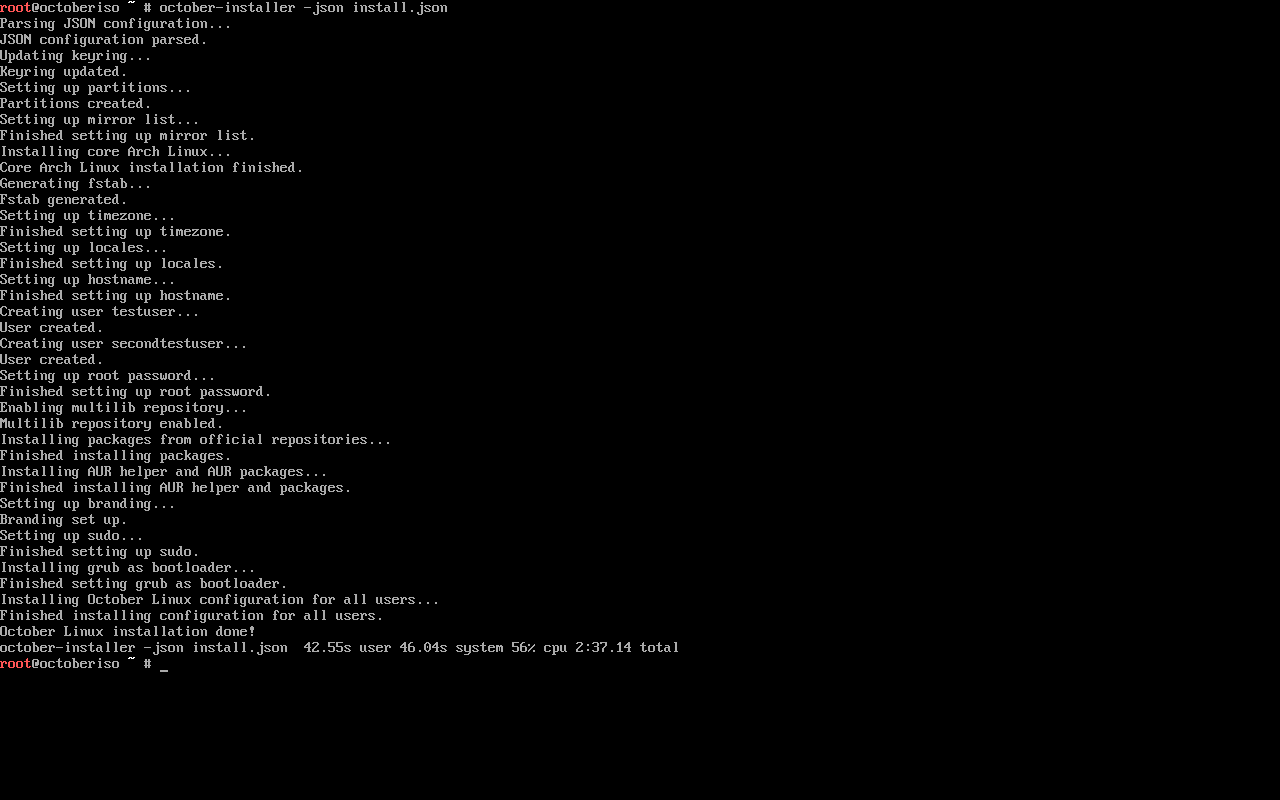
See full picture by clicking here ↗
When it is done, you can reboot and it will just work out of the box. No extra configuration or installation needed.